A chat widget for your website
Add Orca to your site so visitors can ask a question the moment it occurs to them, without calling or hunting for a contact form.
Answer website visitors instantly, even after hours. Orca replies from a knowledge base you control and turns interested visitors into leads in ArrayQ.
Orca AI Chatbot is included in every ArrayQ plan. No credit card required to sign up.
The problem
Someone searches for your service at 9 pm. They land on your site and wonder whether you cover their area or whether you're open on Saturdays. There's no one to ask.
So they do what anyone would: they go back to the search results and message the next business on the list.
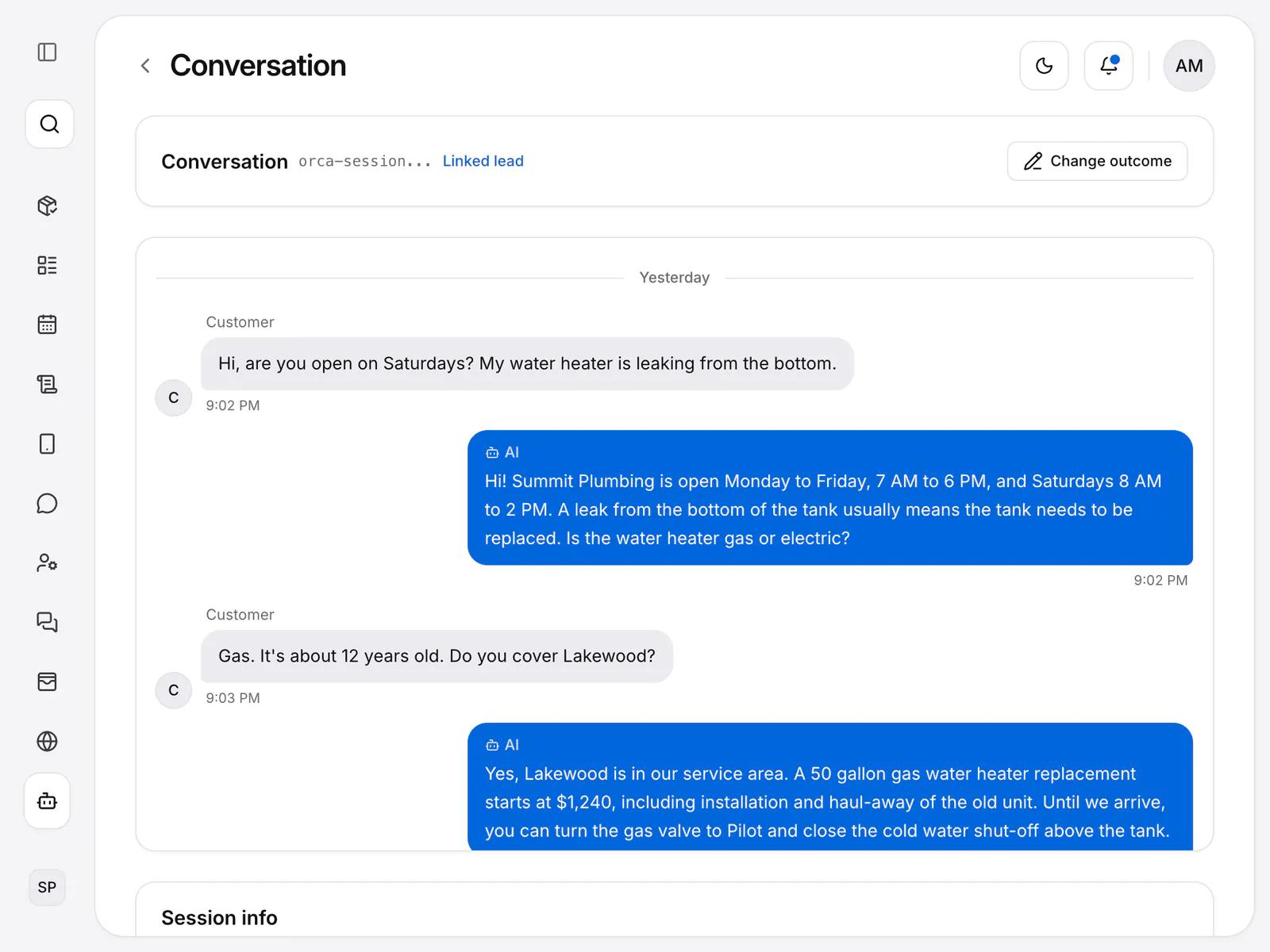
Orca stays on your website and answers at any hour, using the information you give it. When a visitor is ready, Orca collects their details so you can follow up.
Three steps from website visitor to lead
Write your knowledge base: your services, service areas, hours, and policies. This is what Orca answers from.
Visitors ask questions on your website, and Orca replies at any time using your information.
When a visitor is ready, Orca collects their contact details with a lead form. The lead appears in ArrayQ, linked to the saved conversation.
Add Orca to your site so visitors can ask a question the moment it occurs to them, without calling or hunting for a contact form.
Orca uses what you write about your services, service areas, hours and policies. You control the knowledge base and can update it any time.
Read saved conversations to see how Orca responded. When an answer is off, fix the knowledge base it came from.
Visitors can ask about your services, areas and hours at any time. They get an answer when they are curious, not the next morning.
When a visitor is ready, Orca collects their contact details with a lead form, so you don't have to rely on them finding a form on their own.
The lead appears in ArrayQ with the chatbot as its source, and the saved conversation links to it. You can read what the visitor asked before you reply.
Each chat is saved in ArrayQ. You can look back at what visitors asked and how Orca answered.
Review past conversations and chatbot analytics to see the most common questions. Use them to improve your knowledge base over time.
Add the Orca widget to your existing website. It can also run on your ArrayQ-hosted site when your plan includes Orca and the chatbot is enabled.
From the knowledge base you set up in ArrayQ, such as your services, service areas, hours and policies. Orca is only as good as the information you give it, so start with the questions customers ask you most often.
Begin with the basics: the services you offer, the areas you cover, your opening hours and your policies. You can add more over time as you see what visitors ask.
Orca captures the visitor's contact details as a lead in ArrayQ, linked to the conversation. Your team reviews the enquiry, follows up and creates a job when the customer is ready.
Orca creates a lead in ArrayQ with the chatbot as its source. The saved conversation links to the lead, so you can see what they asked.
Yes, when your plan includes the Orca AI chatbot. Add the Orca widget to your existing website, or enable it on your ArrayQ-hosted site.
Yes. Visitors can ask at any time, and Orca replies from your knowledge base.
Orca AI Chatbot is included in every ArrayQ plan.
Every customer's details and notes in one profile.
Learn moreCreate, schedule and track every job from booking to payment.
Learn moreSend clear invoices and follow up on what you are owed.
Learn moreTalk to customers from the same place you manage the work.
Learn moreHost your business website on your own domain.
Learn moreGive visitors a way to ask about your services and capture the details your team needs to follow up.